Long time no see. I’ve been quite busy and it’s been hard to find time to explore new things. This time, my curiosity got the best of me as my colleague from my previous employer asked a question about jump hosts in LinkedIn and I really had to carve some time to figure this thing out in Bastion.
The question was related to jump hosts and phishing resistant authentication methods through them to the resource servers. Jump hosts or jump servers have been used for a while to work as a point of entry into internal networks, they are useful in that other servers in the internal network does not need to be exposed to the internet. However, the idea of using RDP to hop on to a server from which you then hop on to the next seems kind of ancient.
I commented that this could be done with Bastion in a way that the resource server would not need to have a public endpoint and it could only be accessible through the virtual network. As I was writing the comment I knew I needed to test this out, because the functionality would be beneficial to use in other environments as well and I needed to be sure.
So in this blog post, we will gonna explore configuring a Bastion subnet to hub and spoke network in order to provide access to virtual machines for Windows hosts via a native RDP client. Bastion has been around for a while and it has been the way to access VM´s in Azure securely. Exploring older things is still relevant and I still hope that this post proves useful to someone. Shoutout to Microsoft MVP Jukka Loikkanen who already covered the Native Client connections comprehensively on his blog: https://jukkaloikkanen.fi/2025/03/07/native-client-connections-with-azure-bastion/
Architecture
The way Bastion works is that it is in its own subnet that needs to have 443 (HTTPS) allowed from the internet for connectivity. I have placed it into a hub-spoke network architecture that is also recommended by Microsoft Cloud Adoption Framework. There a hub is a place for shared components like Bastion and the spokes can be secured in their unique ways depending on the workloads there are. In this case there is just a VM in the spoke that we are connecting to. Below you can find a picture of the architecture I have in place.
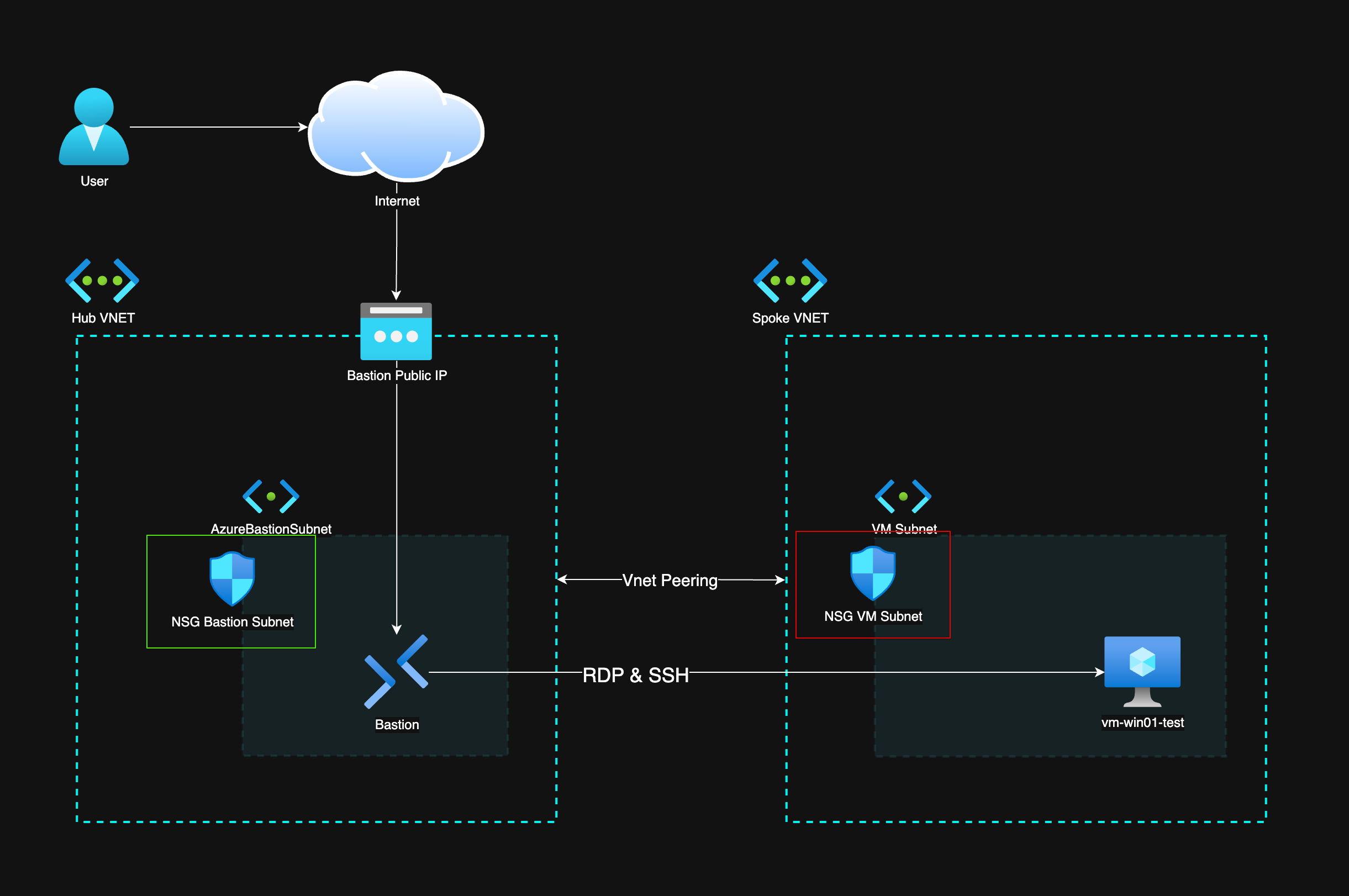
As you can see, the hub is a separate network from the spoke network and there is VNET Peering in between the networks. That extends the networks so that resources can see each other in the separate networks. With VNET peering it´s really important to control the traffic between resources with Network Security Groups (NSG) as the default NSG rules allow VirtualNetwork to VirtualNetwork traffic which also means that it allows traffic within peered networks.
Network Security Groups
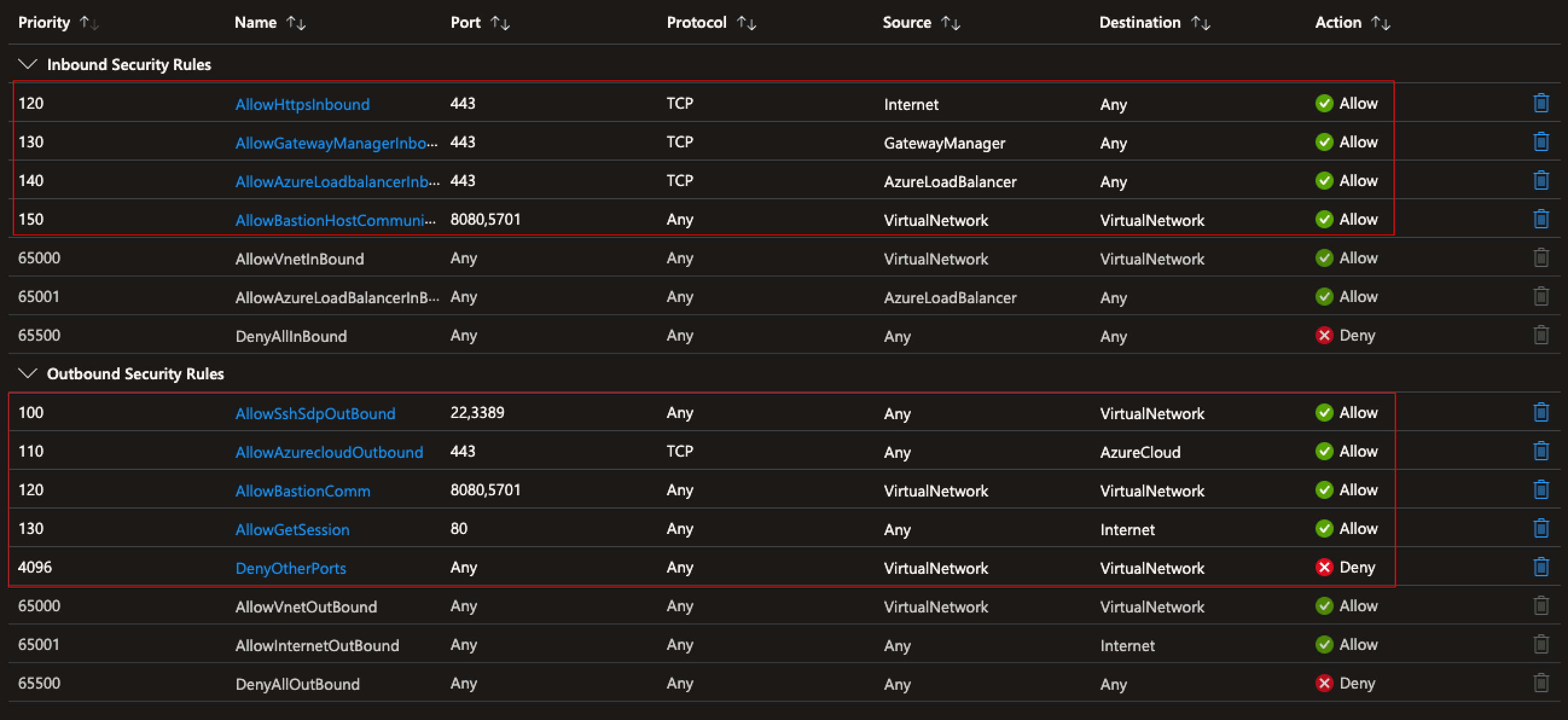
Here are the NSG rules from above NSGs to secure traffic within. First the green square that is associated with the AzureBastionSubnet, it should be noted that these rules are mandatory in order to associate the NSG to said subnet.
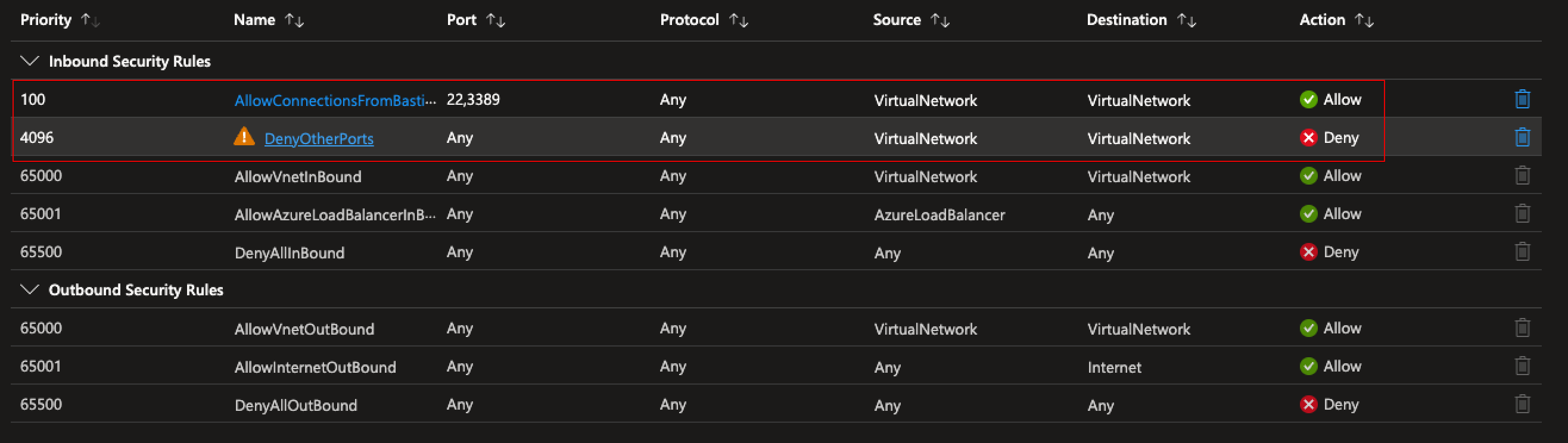
Below is the rules from the NSG associated to the spokes VM subnet. It should be noted that only SSH (22) and RDP (3389) is allowed and only from within the VirtualNetwork. Here is a link to Microsoft documentation that opens up the traffic Bastion uses: https://learn.microsoft.com/en-us/azure/bastion/bastion-nsg. See also the DenyOtherPorts rule that blocks any other intra VNET traffic that the default rules allow.
It´s also good to note that this would work even in one virtual network with separate subnets for different needs. I just wanted to implement this in hub-spoke architecture so that it would be easy to add additional spokes and still use the same Bastion instance to access the VM´s in there as well.
Azure Bastion
Azure Bastion has been in General Availability for a while now and it has been quite usable through the Azure portal. Native client support has also been in GA since 2022. It has been the way to secure RDP & SSH access to virtual machines in Azure since then as it does not require opening ports 22 and 3389 on the virtual machine. You only expose the Bastion Public IP to the internet and the rest of the communication is between Bastion and the VM you are accessing. This in itself replaces the “jump host” way of thinking and accessing your internal network VM´s.
I´m not going to go too much into configuring Bastion since Microsofts documentation is quite clear. You can find it here:
Limitations
Bastion must be at least Standard SKU. Note that Bastion Premium SKU also makes it possible to use Bastion purely from the internal network with a private IP. If you would implement this, you would need to gain access to the internal virtual network with an Express Route or
Both devices must be in the same tenant in order for Native Client connections to work.
Authentication
Here we get to the point of this blog post. How does the authentication work when using Bastion? I’ve talked about securing identities before and it is sort of a love child of mine. If the identity (And authentication event) is not secured, it does not matter how hard you have secured the resource that the user has access to. Todays cybercriminals or hackers do not sit in a dark room hitting keys in a black hoodie and gain access, they log in.
Bastion has two main ways of using it via Azure Portal or with a Native Client. When using Bastion from Azure portal you of course authenticate with your Entra ID credentials when you access the portal. Conditional Access applies here and you can give different requirements to the sign-in event.
Azure Portal
The first way is the way this has worked from the get go. You sign-in to Azure Portal and go on from there.
After sign-in you can navigate to the VM and from the Connect menu, use Bastion to connect with VM´s local user credentials and you are in. Here you can also use Active Directory accounts with permissions to RDP on the VM and if the VM is in the domain. You can also store the user password in a Key Vault and read it straight from there.
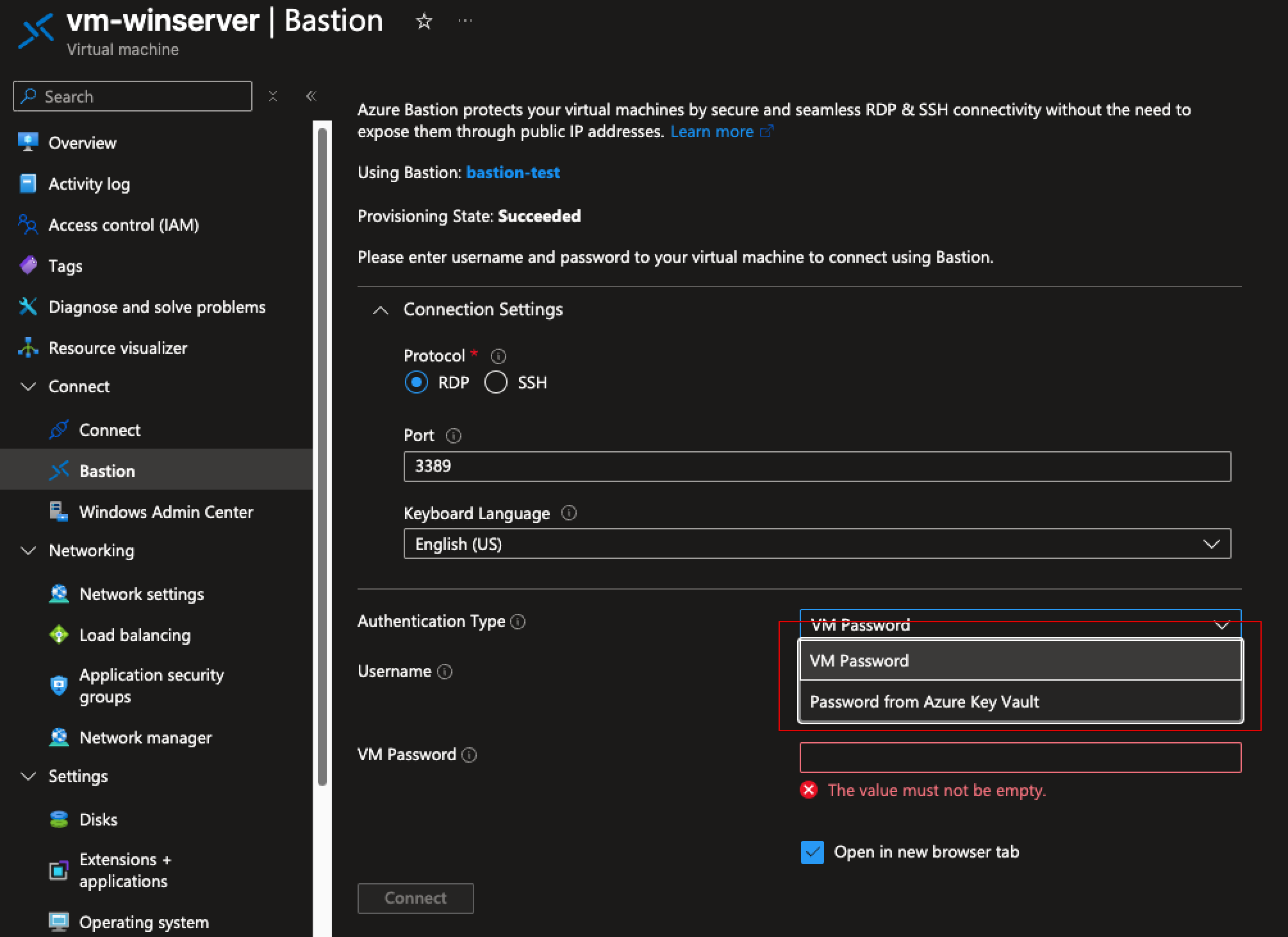
The RDP session from Bastion to the VM is usable through the browser. A major limitation here is that you cannot transfer files using this method.
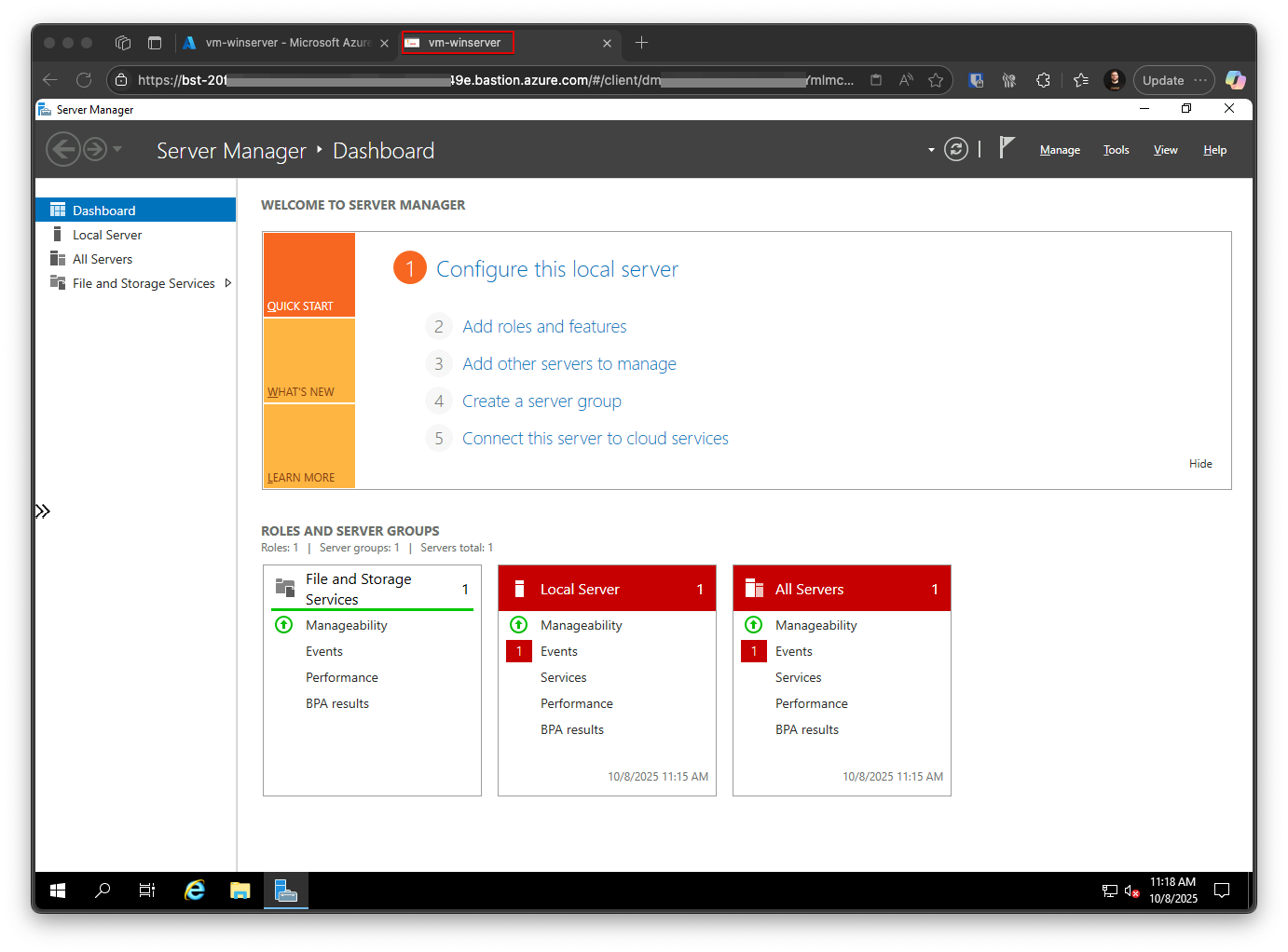
So in order for the portal way to work you need to either:
- Know the username and password that was created during the VM´s creation.
or
- Have a domain joined VM
- Allow AD users log on through Remote Desktop.
- Use your AD username and password
Obviously, you need to limit the users who can access servers via RDP but I would go with the AD way if using Native Client would not be possible. This will lead to the situation that the user can RDP to all of the servers that the first server sees, effectively making the first VM which was accessed through Bastion, a jump host. This was exactly the situation we would like to no use anymore.
Native Client
The one thing that Native Client brings to Bastion usage is the ability to transfer files. It is generally more difficult to use since you need to have Azure CLI installed to trigger the command to start the connection. Looking at security as a black and white comparison between Browser and Native Client usage, Native Client connections bring a bit more attack surface because of the possibility to use custom ports and the possibility to transfer files. Native Client also does not make it possible to record sessions and browser Bastion makes it possible to narrow things down quite a bit so it´s more secure by design.
What´s good in Native Client is that the machine that initiates the connection needs to be registered in the same Entra ID domain.
What about phishing resistant MFA?
Authentication with Bastion happens in two steps. You first have to gain access to the Bastion and then to the VM you are logging into. You also need to have read access to the vm virtual network and bastion as well as user login rights to the VM.
The way I would recommend to require Phishing Resistant MFA when using Bastion is to require it when authenticating to the Bastion. This could be done with a custom role and Privileged Authentication Management (PIM). Add the required roles to the custom “Bastion Users” role and assign users to be eligible to said role. Then you can use Authentication Context in the role activation settings and require Phishing Resistant MFA with a Conditional Access policy in selected authentication context.
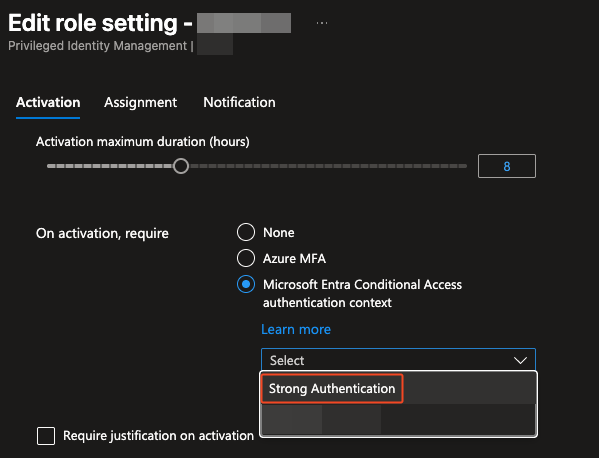
This effectively means that you need to complete Phishing Resistant MFA before gaining the required roles to even use Bastion. After this you can use the method most suitable to your need, Browser if using a machine not in the same tenant or if there is no need for file transfer or Native Client if there is a need for file transfers. With Native Client, the authentication to the VM also uses Windows Hello for Business (other methods not available) so there is double strong authentication there.
You can also just require Phishing Resistant MFA when accessing Azure Portal or Windows Azure Service Management APIs (Azure CLI login) but this impacts a whole lot of users and not just Bastion users.
Conclusion
The main question in my mind when I started the dive to this rabbit hole was that how can you secure access to VM´s with phishing resistant authentication methods that replaces a jump host.
Bastion usage was quite clear but the authentication requirements that happened before the connection were not. With every solution, there is a lot of things to have in mind security wise. Networks and NSG´s, RBAC and Conditional Access leaves a lot misconfiguration possibilities. Phishing Resistant MFA is possible and advisable but it´s not a silver bullet to secure remote access to VM´s.
Check out my post about securing identities here: Securing Azure Identities: The “New” Perimeter in Cybersecurity
Leave a Reply